
Enhanced Document Sending in GoHighLevel: Everything You Need to Know
GoHighLevel has rolled out a major update to its document sending workflow, making the process not only faster but also much more user-friendly. These improvements are designed to help businesses, marketing teams, and agencies save time and avoid errors when sending important documents through the platform. Here’s a closer look at what’s changed and why it matters for your business.
What’s New in GoHighLevel’s Document Sending Modal?
This update brings two significant improvements to the document sending experience within GoHighLevel:
- An always-visible Edit icon: The Edit icon now remains permanently visible on the document send modal. Users no longer need to guess where to click if they want to customise the email message before sending a document.
- Email Template Dropdown: Choose exactly which email template to use before sending your document. No more struggling to find the right tone or layout — switch templates on the fly to match the occasion or client.
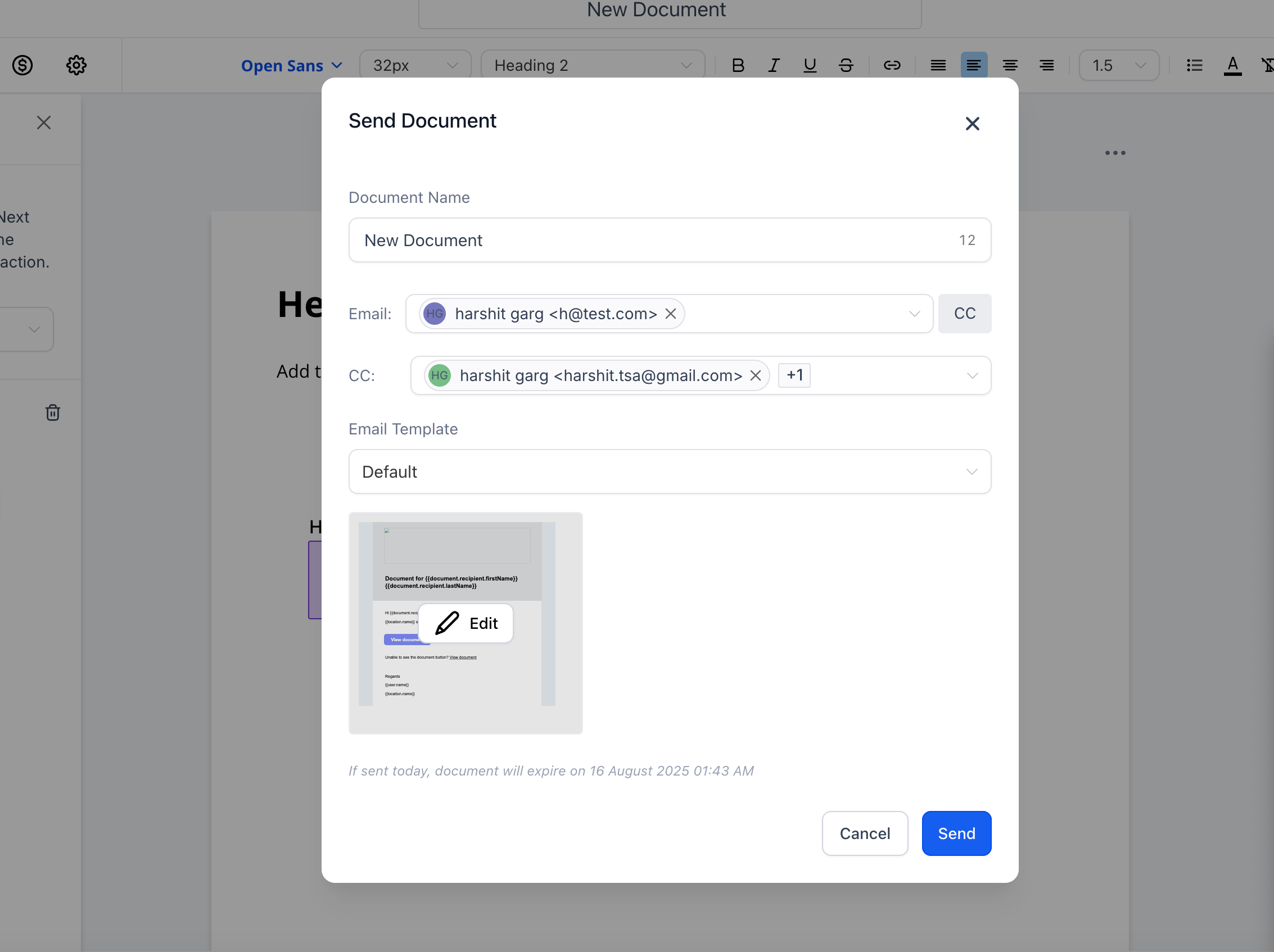
The upgraded modal cuts down on sending mistakes and ensures each recipient receives the right message with the right document attached. It improves both clarity and efficiency for anyone handling client or staff communications via GoHighLevel.
Why Did GoHighLevel Build This?
Many users were unaware that emails could be edited before sending documents. The edit option was not as discoverable as it should have been, leading to wasted time, confusion, or even the wrong information going out.
Similarly, choosing the correct email template was not straightforward. Users often had to rely on default templates or fumble through steps to personalise their message. In fast-paced business environments, this can cause unnecessary delays or mistakes.
By bringing the edit option to the forefront and introducing an easy template picker, GoHighLevel empowers users to deliver professional, accurate communication — every time.
How the Improved Document Send Modal Works
When you’re ready to send a document via GoHighLevel, you’ll now see two clear tools on the modal:
- An Edit (pencil) icon always visible at the top. Click this any time to open up the email editor before you send.
- An Email Template dropdown, right in the modal. This lets you choose, preview, and apply any pre-built template available in your account.

After selecting the template, you can still tweak the content via the edit function, giving you the flexibility to stay on brand or add the personal touches your client expects.
Who Benefits From the Update?
This update is a game changer for:
- Business owners who oversee sales, onboarding, or legal documents and need to ensure every message is tailored and professional.
- Marketing teams working on campaigns or client deliveries, requiring quick personalisation without risking errors.
- Digital agencies that manage multiple brands and need to switch document templates on-the-fly for each client.
If you’re a GoHighLevel user handling contracts, onboarding documents, reports, proposals, or any critical paperwork, the new features can help you streamline your workflow and protect your business reputation.
Key Benefits of the New Document Send Modal
- Speed: Reduce the number of clicks. Edit your email instantly and send the right message, the first time.
- Clarity: Never miss the chance to customise – with the Edit icon always in sight, there’s no second guessing.
- Brand Consistency: Choose the correct email template for every document and audience, ensuring every communication feels bespoke and professional.
- Error Reduction: Preview everything before sending to avoid mishaps or miscommunication.
Use Cases: Putting the New Modal Into Practice
Here are real-world scenarios where GoHighLevel’s improved document sending makes a difference:
Example 1: Agency Sending Proposals
A digital agency sends multiple proposals to prospects each week. With the new modal, team members can quickly select a dynamic proposal email template, then edit the intro to address the recipient by name, referencing their specific requirements.
Example 2: Onboarding New Clients
An account manager at a SaaS company uses GoHighLevel workflows to automate onboarding docs. The manager picks the right “Welcome to Our Service” template, adds a personal message, and sends with minimal friction, ensuring each client gets a tailored experience.
Example 3: Legal Teams or HR Departments
Law firms or HR professionals send contracts to different departments or clients. With the new dropdown, they can shift between an “Employment Contract” or “Consulting Agreement” template, edit as needed, and send with confidence, minimising compliance risks.
Getting the Most Out of the Update: Best Practices
- Customise, then Standardise: Build out a variety of email templates for every type of document you send. Use the new dropdown to keep communications relevant and on-brand.
- Double-check before sending: With editing now so accessible, make it a habit to review every email before clicking send.
- Automate where possible: Pair the new features with GoHighLevel’s workflow automations to reduce manual work, while keeping personalisation at your fingertips.
- Train your team: Especially in larger organisations, ensure every team member is aware of the template options and editing features to maintain brand quality.
Troubleshooting and Tips
If you ever have an issue finding templates or the edit icon, check that your GoHighLevel account is updated to the latest version. For agencies managing multiple sub-accounts, make use of the template folders and naming conventions to stay organised. Training videos and help docs are available in the GoHighLevel support centre for hands-on guidance.
Related GoHighLevel Updates
GoHighLevel has been consistently updating its platform to empower users. If you find the improved document modal useful, you may also want to explore:
- Email Template Workflow Updates for team collaboration on communications.
- Bulk Actions in Kanban for managing pipelines at scale.
- Unified Task UI Update for streamlined management of contacts and opportunities.
Conclusion: Better Document Workflows With GoHighLevel
The improved document sending modal in GoHighLevel isn’t just a minor quality-of-life change — it represents a fundamental shift towards more transparent, efficient, and professional communications. By making the editing process obvious and letting users select templates at the point of sending, GoHighLevel gives every business the tools to move faster while still maintaining a personal touch. Ready to elevate your client communications? Discover what’s possible with the latest GoHighLevel features today.