

Introducing GoHighLevel’s New Processing Charges Feature
GoHighLevel has rolled out a powerful update that empowers businesses to reclaim control over payment-related costs. The new Processing Charge and Additional Fee option enables agencies and business owners to transparently pass on processing fees, miscellaneous charges, or convenience fees directly to customers. This long-awaited feature comes as a response to the growing need for transparency, cost management, and compliance within the digital payment landscape.

What Is the New Processing Charge Feature?
The new update allows you to add clearly labelled processing or miscellaneous fees as distinct line items during checkout for your customers. This means you can now pass on transaction costs, such as payment processing charges and service fees, rather than absorbing them within your margins.
This feature can be customised for various payment interactions—Invoices, Funnels, Payment Links, Forms, and Surveys—giving you the flexibility to apply extra charges precisely where you need them. The result? Enhanced transparency for your clients and improved bottom line for your business.
How the Feature Works
With just a few clicks in Payments Settings, you can configure and label any extra charge. You determine the percentage of the fee and how it is described to your customers. You can enable or disable the fee at any time, and choose exactly which checkout or payment methods will display it using easy check boxes.
The calculation is simple: the fee is applied only to the (Subtotal – Discounts + Taxes), ensuring fairness and clarity for the customer.

Key Features and Customisation Options
- Toggle the processing charge on or off for specific products, services, or forms.
- Set the fee as a specific percentage of the transaction amount.
- Add a custom label (e.g., ‘Processing Fee’ or ‘Convenience Fee’) that displays on customer checkouts and receipts.
- Apply the charge to Invoices, Funnels, Payment Links, Forms, and Surveys individually.
- Full visibility: fees show as a unique line item during checkout and in exports under easy-to-find columns.

Who Benefits From This Update?
This update is a game changer for many types of GoHighLevel users:
- Agencies managing client billing through GoHighLevel can now recoup platform and card processing costs with full transparency.
- Business owners selling via funnels or payment links can automatically pass on charges to buyers, protecting profits.
- Marketing departments get new options for managing promotional or convenience-based fees during campaigns and events.
Why This Matters: The Business Case for Processing Fees
Payment processing costs quickly eat into profits, particularly for high-volume businesses. By passing these charges on—clearly and upfront—businesses avoid confusion, build trust through transparency, and remain competitive. Even a small fee, when spread over hundreds or thousands of transactions, can have a major impact on your overall financial health.
This flexibility is especially important today, as payment providers and card issuers adjust their own fee structures. Now, with GoHighLevel, you can pass those changes along to your customers without awkward conversations or surprise invoices.
Real-World Examples and Practical Use Cases
Let’s look at how GoHighLevel’s new processing charge feature can be utilised in different real-world scenarios:
Example 1: Digital Marketing Agency
A marketing agency frequently invoices clients for campaigns and recurring services. With processing charges enabled, each client sees a ‘Processing Fee’ of 2.5% as a separate line item on their invoice and payment receipt. This covers card transaction costs, so the agency’s profit margins are protected and client billing stays transparent.
Example 2: Online Coaching Business
An online coach uses funnels for selling access to webinars and paid content. By adding a convenience fee to checkout, she automatically includes the cost of secure online transactions and digital delivery. Customers see the fee during checkout—no surprises, no hidden costs.
Example 3: Training Provider Using Surveys and Forms
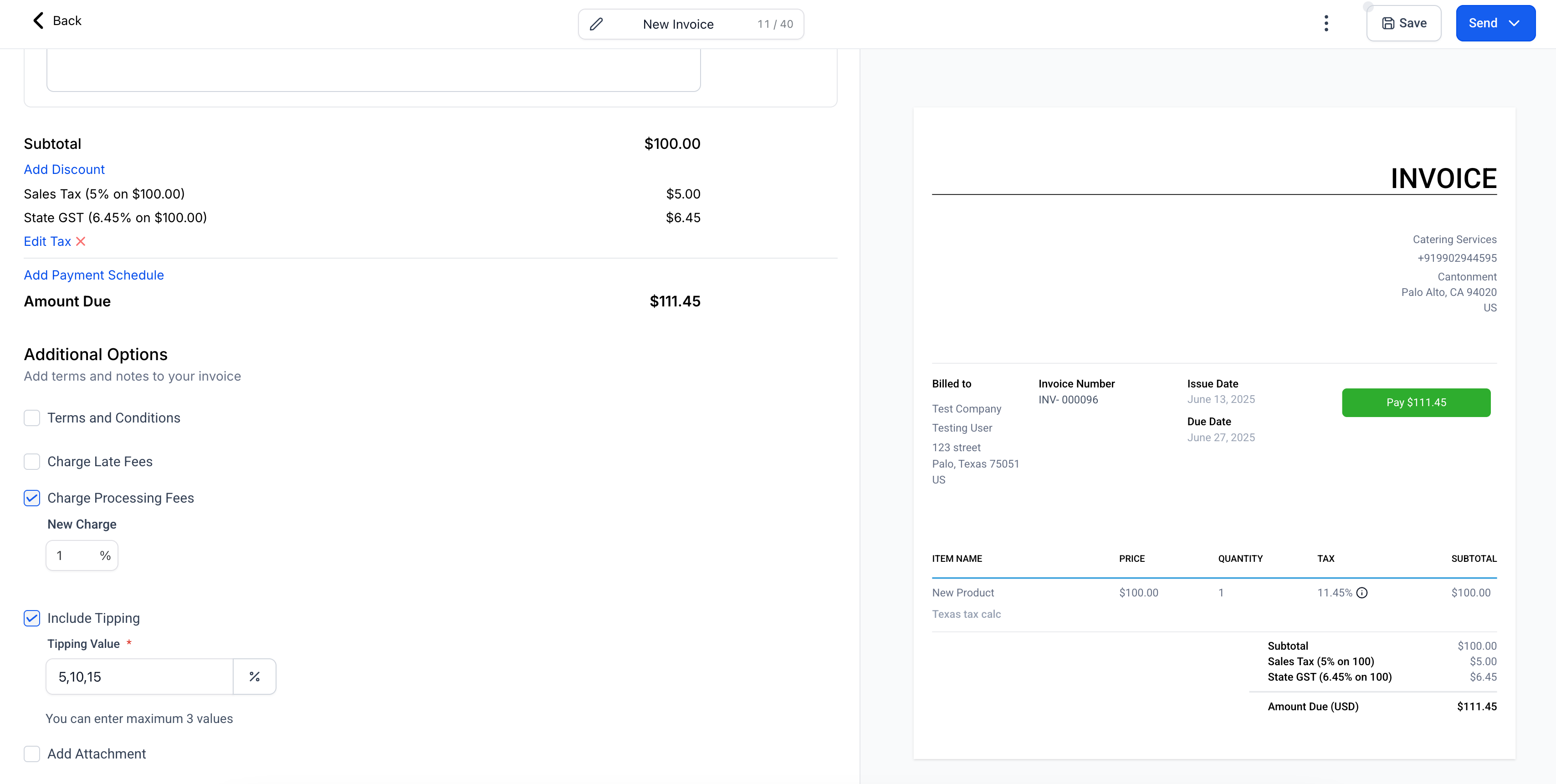
A training company collects sign-ups for workshops through custom forms and surveys. Processing fees are displayed as a distinct line on the payment screen, making it clear which portion is a fee and which covers the course tuition. This level of clarity boosts trust and reduces support requests about unexpected charges.
Configuring Processing Charges in GoHighLevel
Setting up processing fees in your GoHighLevel account is straightforward. Here’s how:
- Go to Payments > Settings > Miscellaneous Charges > Processing Charges in your dashboard.
- Enable the processing charge option.
- Set your percentage fee and add a custom label.
- Select which payment channels (Invoices, Funnels, Payment Links, Forms, Surveys) you want to apply the charge to using the checkboxes.

You can update or disable the fee at any time. Newly issued invoices or checkouts reflect your latest settings, but anything already sent or paid stays as it was—so there’s never any backdating confusion.
How Customers Experience the Fee
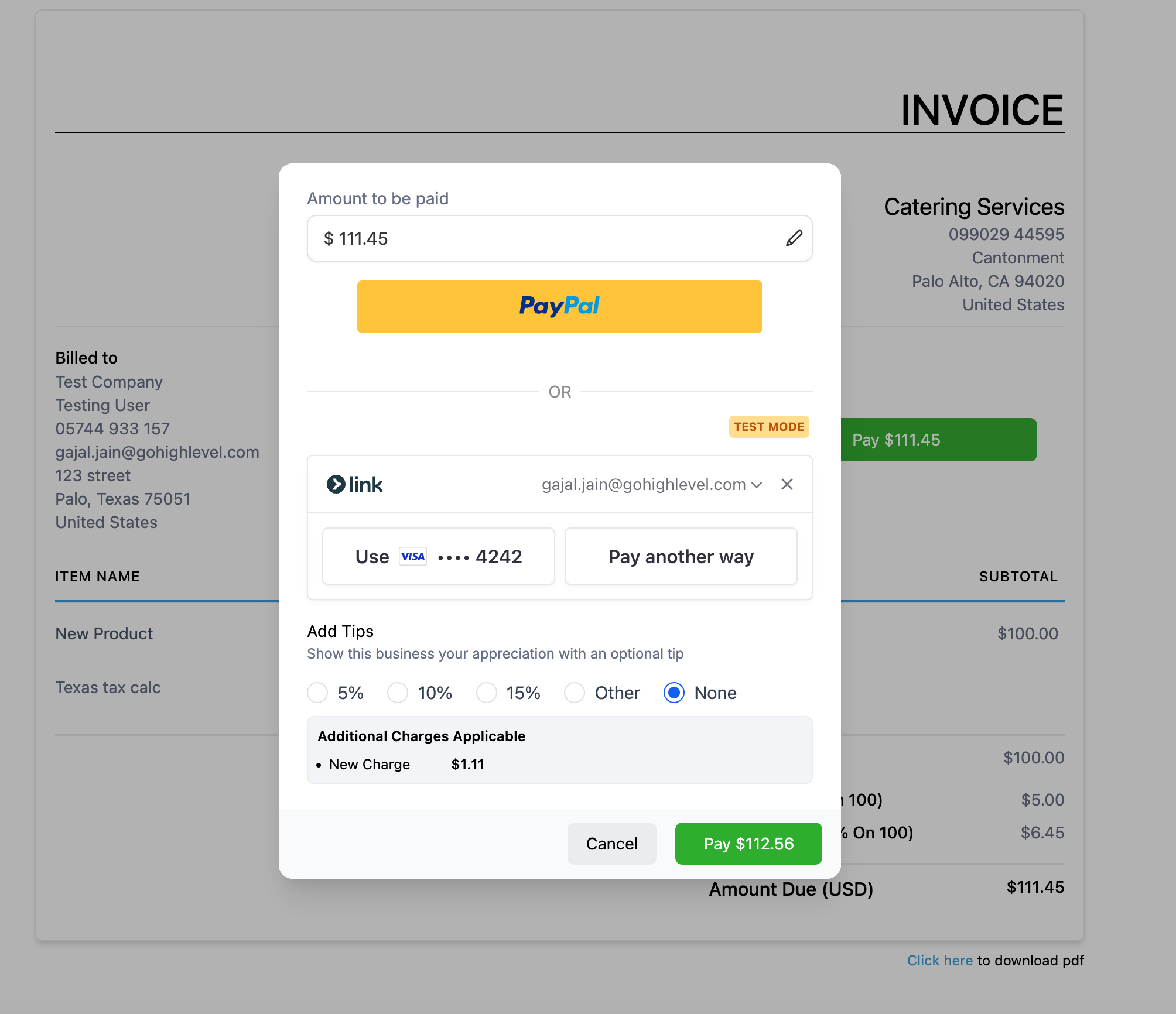
End customers are shown the fee as a distinct, labelled line item at checkout or payment—whether on an invoice, funnel, or form. They also see it clearly marked on their transaction receipts and in exported transaction data as “Processing Charge Amount” and “Processing Charge Name”.
Important Behavioural Notes & Limitations
- Any invoices or orders created before activating the fee will not have it retroactively applied.
- If you disable the fee, it’s removed only from future or editable invoices and checkouts—not previously completed transactions.
- Currently, this feature works for PayPal and Custom Payment Providers on Invoices. Stripe and mobile app invoice support are coming soon.
- Mobile payments made through the app cannot display the fee yet—this is planned for an upcoming release.
Future Roadmap
GoHighLevel is continuing to invest in payment flexibility. Coming soon, you’ll see:
- Support for more channels (such as E-commerce, Mobile POS, Calendars, and more)
- Different fees for different channels (e.g., different processing fees on Funnels vs Invoices)
- Provider-specific fees (for example, different rates for Stripe vs PayPal)
- Enhanced reporting, analytics, and filtering options to easily reconcile and understand your fee revenue

Stay up to date with these changes by bookmarking GoHighLevel’s official Processing Charges Help Guide.
Synergise with Other GoHighLevel Features
This update works beautifully alongside GoHighLevel’s range of billing, marketing, and automation tools. For instance, agencies using GoHighLevel’s WhatsApp integration for client communications can now combine seamless payment collection with transparent fee handling. The result is streamlined operations and happier, better-informed customers.
Conclusion: Maximise Profits with Transparent Fees
GoHighLevel’s new Processing Charges feature is a milestone update that puts control and transparency in your hands. Whether you’re running an agency, a consultancy, an e-commerce site, or any business that takes payments online, you can now manage ancillary fees effortlessly. This means less time lost to manual calculation or awkward conversations, and more time spent growing your business.
Ready to see the difference? Explore all of GoHighLevel’s payment, automation, and marketing features today and give your business the edge it deserves.