
Global Tax Compliance Made Simple with GoHighLevel’s International Automatic Taxes Update
Managing taxes for an international customer base has long been one of the most complex challenges for businesses and digital agencies. With the latest GoHighLevel International Automatic Taxes update (including VAT), companies can now configure and apply automatic taxes seamlessly in the USA, UK, EU and other countries – all directly within their favourite CRM platform. This innovation empowers businesses to achieve tax compliance, accurate customer billing, and peace of mind as they scale internationally.

What Is the International Automatic Taxes Update?
The International Automatic Taxes update introduces robust, multi-country automatic tax calculation – supporting sales taxes, VAT, and other local regulations world-wide.
This update automates the process of collecting the right taxes at checkout and invoice payment. Tax rates, VAT, and tax IDs can be set up per country or region, with the flexibility to comply with different jurisdictions and product rules. Management is simplified, as everything is accessible via easy-to-use dashboards within GoHighLevel.
The update unifies and streamlines the tax setup process for businesses selling both domestically and internationally, removing manual headaches and compliance risks. Taxes are now handled for:
- United States (state-level sales tax)
- United Kingdom (VAT)
- European Union (VAT, OSS)
- Canada (GST, HST, PST, QST)
- Other supported global countries and jurisdictions
It works across all payment providers and checkout types: Funnels, Payment Links, Invoices, Estimates, and E-commerce Stores. This foundational update provides the flexibility and compliance modern companies need as they grow worldwide.

How Does It Work? Step-by-Step Overview
Let’s break down the key components of GoHighLevel’s new international tax rules – and how your business can take full advantage:
1. Configure Your Nexus Addresses
First, head to Payments > Settings > Taxes > Automatic Taxes. Here, you can add the countries or states (“nexus addresses”) where you have tax obligations. This determines where GoHighLevel must automatically collect taxes.
For example, if you sell digital marketing services in the US, UK, and France, just add those countries. If your business is US-based, you’ll also want to specify the individual states where you have nexus. Bulk selection lets you add multiple regions in seconds.

2. Input Country-Specific VAT or Local Tax IDs
Enter your VAT ID, US EIN, or other official business tax identifier for the appropriate country or region. This ensures proper treatment of taxes on international B2B and B2C transactions, and can unlock exemptions or special local rules as allowed by law. Tax IDs can be edited anytime.

3. Tax Calculation on Every Sale – No More Guesswork
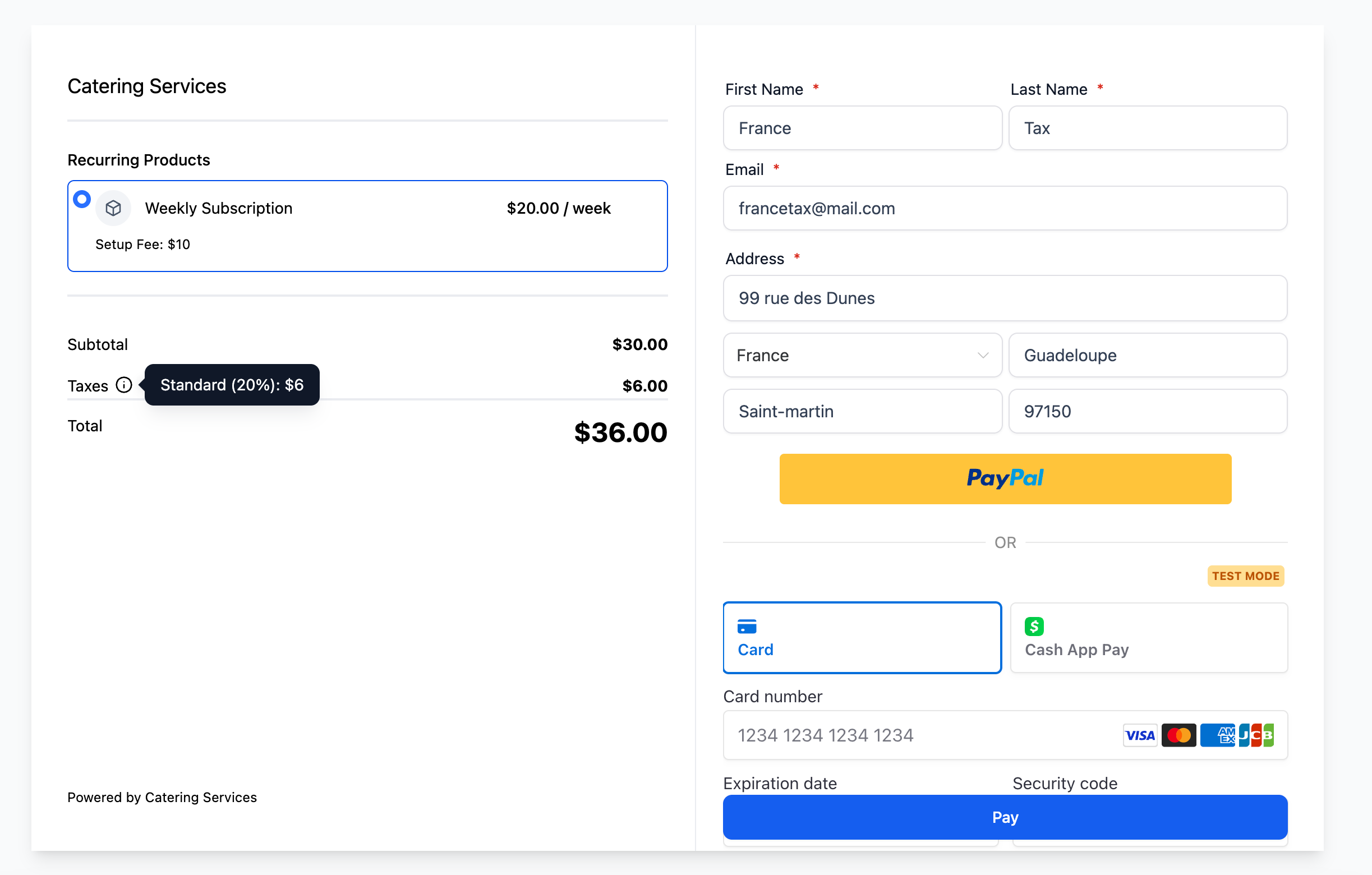
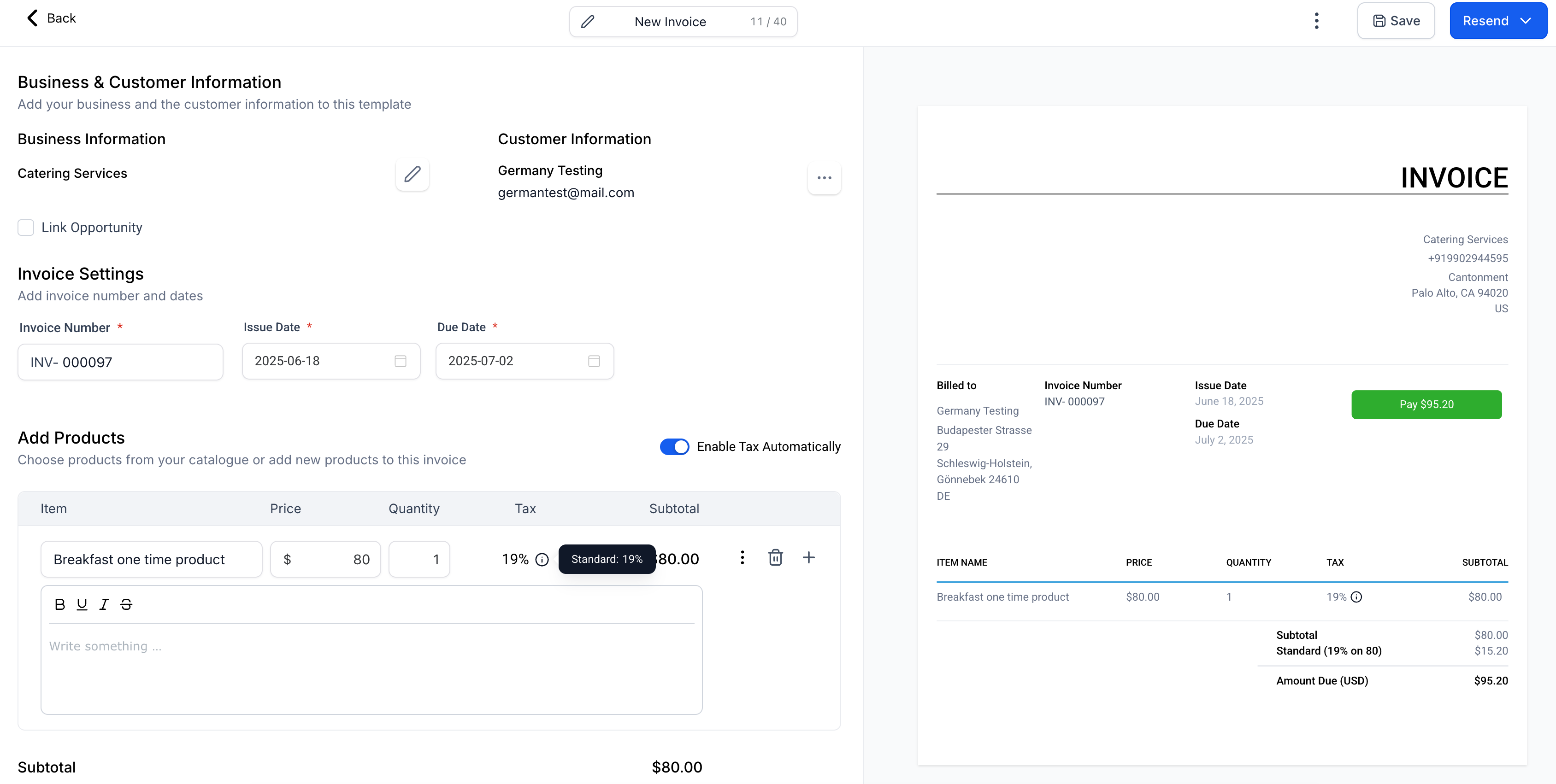
Once nexus addresses and tax IDs are configured, GoHighLevel automatically calculates and applies the correct local taxes on every checkout, payment link, invoice, or estimate – using your customer’s shipping or billing address for accuracy. This covers:
- Funnels and website sales
- One-off and recurring invoices
- Instalment, ecommerce, and payment link purchases
This update means every international payment you take will meet the required tax regulation for both you and your customer – out of the box.

4. Product-Level Tax Configuration
You can now set tax codes and rules per product. This is essential if you sell a mix of services and goods, or if digital/downloadable and physical products are taxed differently per region. Set or edit product-specific tax settings in Payments > Products, ensuring accuracy globally.

5. Bulk Actions for Streamlined Management
Add multiple countries or states in one go when configuring your nexus addresses. Even if you sell worldwide, you can set up global compliance in minutes, not hours. While deleting nexus entries requires individual review, removing a country also removes its sub-regions for maximum control.

6. Transparent, Guided Migration for Existing Users
If you already use GoHighLevel’s previous US Automatic Tax tool, a guided migration flow appears in the tax settings dashboard. This makes the transition to the new global tax system smooth and intuitive. Reconfigure nexus addresses and tax rules for sub-accounts and products, ensuring nothing is missed before older features are deprecated in six months.
Who Will Benefit from the International Automatic Taxes Feature?
This update is a game-changer for several types of businesses and operators:
- Digital Marketing Agencies: Serve clients around the globe and manage multiple tax locales per account or product line
- E-commerce Stores: Automate compliance for global sales, especially where VAT or sales tax can shift based on product type and region
- SAAS Companies & Consultants: Easily apply the correct tax on digital goods and recurring subscriptions in the EU, US, UK, and beyond
- Enterprises & Franchises: Oversee multinational operations without switching between localised payment systems or invoicing tools
- Anyone selling memberships, online courses, or services internationally
By enabling one central tax engine across all revenue streams, GoHighLevel addresses a major compliance and operational headache for global businesses of every size.
Why Does This Update Matter?
The world of digital commerce expects frictionless, transparent checkout experiences – and governments expect accurate tax collection. Failing to collect the right local taxes (especially VAT, GST, or state sales taxes) can lead to fines, blocked payments, or costly audits. Relying on manual tax calculations exposes your business to compliance risk and unhappy customers.
With these new automatic tax features, GoHighLevel offers:
- Peace of Mind: Always charge the correct amount, automatically
- Time Savings: No need to look up rates or write custom tax logic
- Scalability: Onboard new countries or product lines in a few clicks
- Improved Customer Trust: Accurate, compliant bills every time
- Support for Digital, Physical, and Hybrid Offers: Configure once, sell anywhere
This feature is particularly important for users in regions with complex tax regulations, such as the US, Canada, UK, and the EU. Businesses can expand internationally with less hassle and a single process.

Example Use Cases and Scenarios
To fully illustrate the value of this update, let’s explore a few typical business scenarios:
Digital Agency Serving UK, Germany, and US Clients
A marketing agency has customers in London, Berlin, and New York. The agency must collect UK VAT for British clients, EU VAT for European clients, and sales tax for US clients in states where they have a presence. With GoHighLevel, add each country (and relevant US states) to the nexus addresses, enter the VAT and tax IDs, and the platform will handle all regional taxes at checkout – no more spreadsheets or plugins.
SAAS Selling Software Subscriptions in the EU
A software company based in Ireland sells a CRM platform to clients in France, Spain, and Italy. When customers check out, the correct VAT is calculated and displayed, and invoices follow legal standards. The company’s VAT ID is linked to each sale for cross-border B2B deals, ensuring correct tax treatment and audit protection.
E-commerce Store Scaling into New Countries
An online retailer wants to launch in Canada and Australia. By adding Canada and Australia to the list of nexus addresses, GoHighLevel instantly starts applying GST, PST, and other relevant taxes per local rules. At the same time, the business can remove any countries where they no longer operate, staying audit-proof.
Want more on using GoHighLevel for e-commerce? See our post on multi-method payments in GoHighLevel’s checkout.
Getting Started: Where to Configure Automatic Taxes in GoHighLevel
Ready to automate your global tax compliance? You can access and set up these features via:
- Global Tax Settings: Navigate to Payments > Settings > Taxes > Automatic Taxes
- Product-Level Settings: Go to Payments > Products > Edit/Create > Product Tax Code

What’s Next for GoHighLevel’s Tax Automation?
This is just the beginning. GoHighLevel’s roadmap will soon deliver even more power and granularity, including:
- Capturing customer business tax IDs at checkout to support local B2B tax rules and exemptions
- Product-level toggling of automatic taxes for advanced scenarios
- Support for cross-border (import/export) duties and custom taxes

For a summary of all the latest GoHighLevel enhancements, check out our update posts, such as how to pass processing fees to customers or new templates for websites and funnels.
Key Benefits At a Glance
- Supports automatic tax calculation for dozens of countries, including all 27 EU member states, UK, US, Canada, and more
- Enables quick setup and bulk management of tax obligations
- Ensures accurate, audit-proof billing on every transaction
- Works flawlessly across Funnels, Payment Links, Invoices, Estimates, and E-commerce stores
- Reduces errors, manual work, and compliance risks
For more on automating invoices and billing, don’t miss our guide to recurring invoice workflows in GoHighLevel.
Conclusion: Unlock Seamless Global Tax Compliance with GoHighLevel
The new International Automatic Taxes feature marks a turning point for global GoHighLevel users. Businesses can now automate the maths, the compliance, and the headache of tax regulations in every key market – all from a central dashboard, for every product and every country. Whether you’re adding a new market or optimising your operations, GoHighLevel puts effortless tax compliance at your fingertips.
Start exploring GoHighLevel’s international tax automation now and ensure that your growth stays compliant, accurate, and truly global. Ready to see how GoHighLevel will streamline your billing and sales? Discover more with GoHighLevel today.