

GoHighLevel Introduces Processing Charges Feature: A New Era for Transparent Payments
The world of online transactions is shifting rapidly, and businesses are under more pressure than ever to maintain profitability, transparency, and flexibility. GoHighLevel’s latest update – the ability to pass processing charges or additional fees directly to customers – is a game-changer for agencies, SaaS companies, and ambitious business owners.

What Is the GoHighLevel Processing Charges Update?
GoHighLevel now makes it possible for businesses to transparently pass on payment processing charges, convenience fees, and other miscellaneous tariffs to the end customer. This feature is controlled via a flexible setting in the Payments section and is designed to give enterprises more power over their revenue, all while ensuring clarity for customers.
The option allows you to set a percentage-based fee and label it however you like, making the checkout and invoicing process honest and upfront. No more guesswork about where those little extra costs come from — it’s all visible for both you and your customers.

How Does the Processing Charges Feature Work?
This update is accessible via Payments > Settings > Miscellaneous Charges > Processing Charges within your GoHighLevel workspace. Here is how the mechanism functions from configuration to end result:
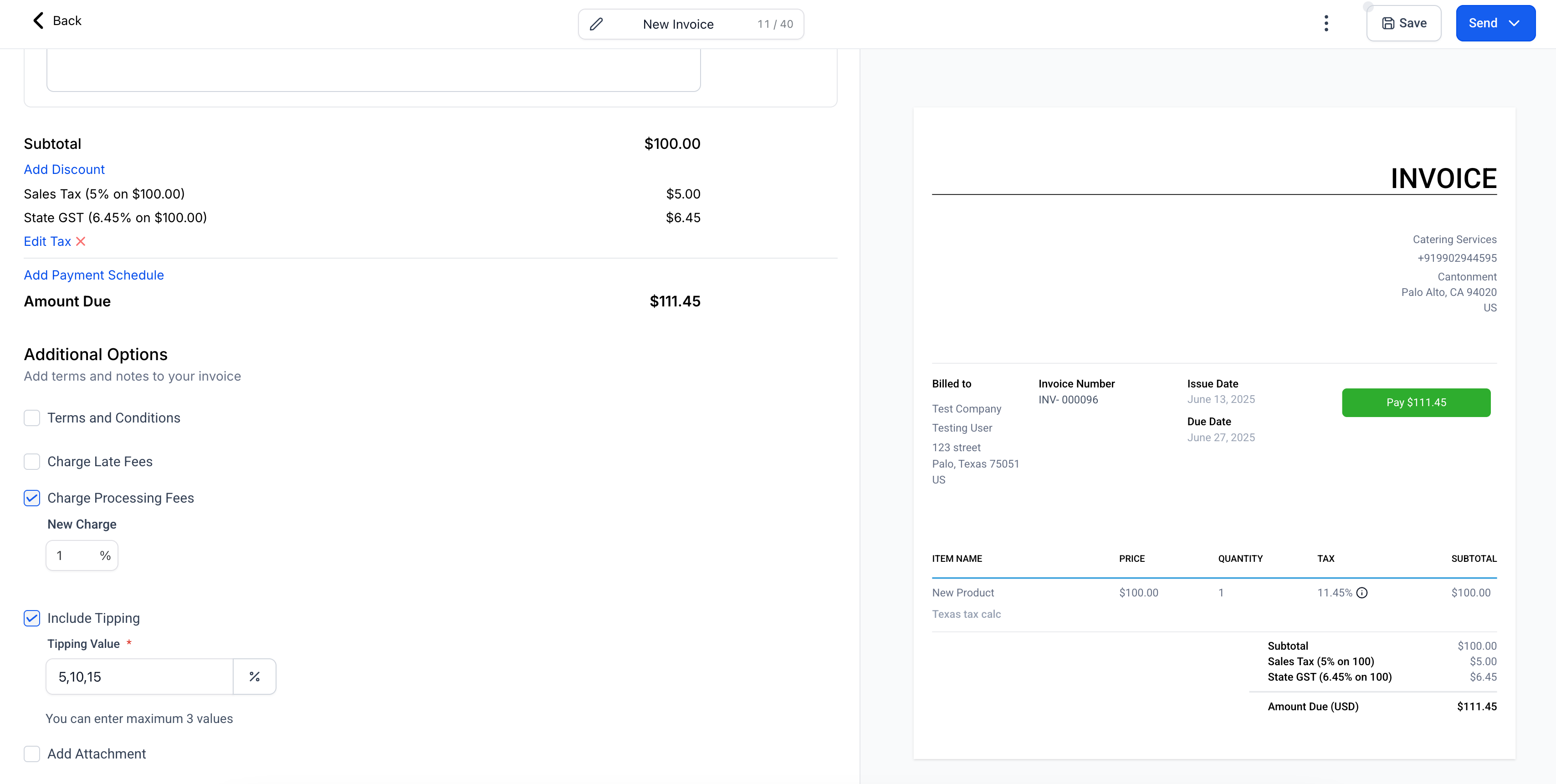
- You can toggle the processing charge option on or off as needed.
- Set the fee as a percentage and give it any custom label (e.g. “Processing Fee”, “Convenience Charge”, etc).
- Decide exactly where you want to apply the fee: invoices, funnels, payment links, forms, and surveys.
- The fee will be automatically calculated on the amount after discounts are applied and taxes are added (Subtotal – Discounts + Taxes).
- Customers will see this fee broken out as a distinct line item during checkout and on their transaction receipts.

This feature is currently supported on most GoHighLevel payment experiences, including invoices, checkout forms, and more. Note that invoices already sent or orders already placed will not be affected retroactively by new settings. If you wish to alter an already sent invoice, it must first be editable within your portal.
If you’re exploring more automation possibilities in payments and invoices, make sure to check out our in-depth guide on passing processing fees to customers in GoHighLevel.
Who Benefits From This GoHighLevel Update?
The new processing charge setting is designed to bring value to a range of users, including:
- Agencies and SaaS businesses who want to maintain or increase margins despite rising provider and gateway costs.
- Business owners aiming for absolute clarity in customer transactions.
- Marketers wishing to experiment with payment flows and easily cover platform expenses.
- Consultants and freelancers who want to offset custom payment provider costs on a by-client or project basis.
Ultimately, this update optimises both B2B and B2C payment operations while reducing friction from hidden costs or revenue erosion.
Why the Processing Charges Feature Matters
Cashless payments are convenient, but the ever-expanding variety of payment methods comes with increasingly complex fee structures. Stripe, PayPal, and other gateways add variable processing fees on every transaction, taking a bite out of your profit with each payment.
Until now, absorbing these fees has typically fallen on the business owner’s shoulders. The ability to transparently pass these costs to the customer achieves several important goals:
- Greater transparency. Customers see exactly what they’re paying, making them more likely to trust your business.
- New revenue control. You can preserve your intended income structure, undiluted by unforeseen charges.
- Flexible labelling and segmentation. Adapt the fee name to fit your brand voice or compliance environment.
- Simple scalability. Whether you run a boutique agency or a multinational SaaS, this process is handled automatically.

Additionally, with features like easy fee toggling and per-channel configuration, you can test, iterate, and fine-tune your customer experience instantly.
How to Configure Processing Charges in GoHighLevel
The set-up process is intuitive, even for a beginner:
- Navigate to Payments > Settings in your GoHighLevel sub-account.
- Scroll to Miscellaneous Charges and locate the Processing Charges module.
- Switch the feature On and assign a fee percentage (e.g. 2.5%).
- Give the charge a name (e.g. “Convenience Fee” or “Processing Surcharge”).
- Tick the checkboxes beside each payment channel you wish to apply the fee to (Invoices, Funnels, Forms, Payment Links, Surveys).
- Save changes. The new fee will appear instantly to end customers at applicable checkouts.
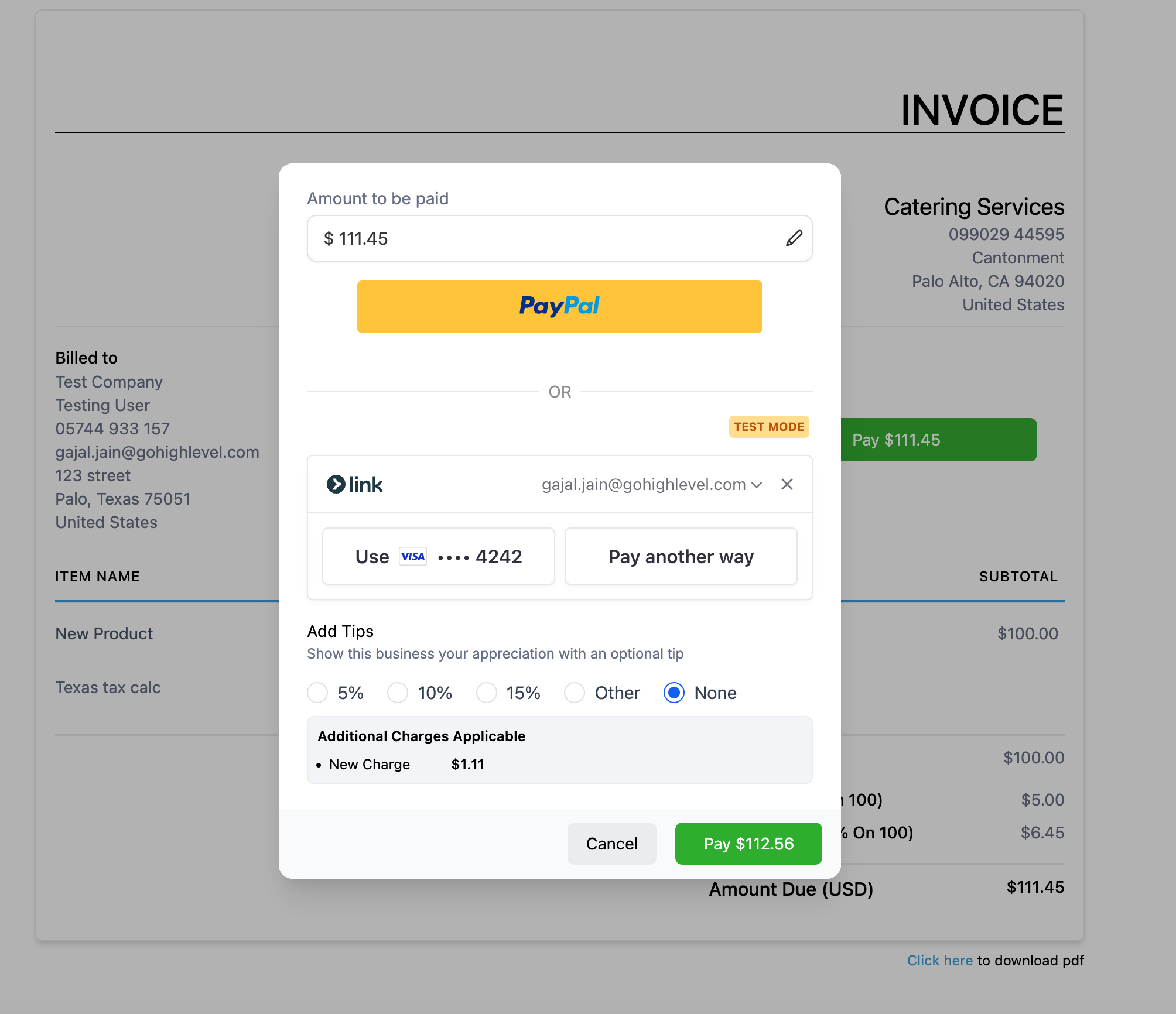
Note: At launch in June 2025, this feature is supported for PayPal and Custom Payment Providers on invoice checkouts. Support for Stripe and others is coming soon, as is application to mobile invoices.
A Closer Look: Where the Processing Fee Appears
Transparency is the key. When enabled, the charge will display as a unique line item during every eligible checkout event, be it invoice, funnel, form, survey, or payment link.

Customers are alerted upfront and post-purchase. And you get a clear record, as the fee is also exported in transactions and order logs with both label and value. Want granular transaction details? This update delivers them at every step.
For more automation advances, have a look at our recent post on GoHighLevel’s Download Button automation and other cutting-edge campaign improvements.
Examples and Use Cases for Agencies & Businesses
The processing charge update unlocks new opportunities for many business types:
1. Agencies Charging Clients for Card Processing
Suppose you’re running an agency retainer model. You can now add a transparent “Card Processing Fee” to invoices or payment links. This protects your profit margins, especially on high-ticket services.
2. SaaS Platforms Adding a Convenience Fee
If you operate a SaaS and want to offset PayPal charges or similar, display a “Convenience Fee” at checkout to share the cost without hiding it in your general pricing.
3. E-commerce Brands Handling Miscellaneous Charges
Many e-commerce businesses have unexpected, one-off costs (custom taxes, regulatory fees). Add a flexible “Miscellaneous Fee” as required and show it clearly on invoices or forms.
4. Event Organisers and Coaches
When you sell tickets or courses via payment links or forms, you can pass on platform or merchant fees directly to attendees without adjusting ticket prices up or absorbing them into your bottom line.
Need more strategies on maximising revenue flow? Read our coverage on how to pass fees to customers in GoHighLevel and make your workflow bulletproof.
Limitations & Important Notes
There are a few critical points to keep at the forefront:
- Invoices or orders sent/placed before changes are made will not be updated automatically. Edit them if changes are needed.
- If you deactivate the processing charge, it won’t be removed from locked invoices/orders unless you manually edit them.
- At release, invoice charges are supported for PayPal and custom providers only. Stripe and others coming soon.
- Invoices paid through the GoHighLevel mobile app are not yet supported — functionality will be rolled out soon.
For a deeper breakdown of fees by channel and future enhancements, you can monitor the official help docs or subscribe to our GoHighLevel newsletter for rolling updates.
What’s Next for GoHighLevel Processing Fees?
GoHighLevel plans to expand this feature even further over the coming months:
- Support for more payment channels, including ecommerce, mobile POS, and calendar bookings
- Distinct fees for different sales channels (e.g. separate fees for invoices, funnels, and more)
- Provider-specific charges (for Stripe, NMI, and others)
- Enhanced reporting and filtering for all processing fees collected
This continued evolution will help GoHighLevel users of all sizes keep pace with the latest payment best practices, compliance requirements, and profit retention strategies.
Curious about other recent automations? Browse our update on GoHighLevel’s sub-account affiliate manager and unlock even more capabilities.
Conclusion: A Major Step Towards Payment Transparency and Control
The new processing charges feature establishes GoHighLevel as not just a CRM or automation tool, but as a robust, business-first payments platform. You gain flexibility, transparency, and an edge in managing your costs at scale — vital in today’s competitive market.
Ready to level up your GoHighLevel payments and revenue strategy? Start customising your processing fees, or explore practical how-tos here. Adopt this feature and put yourself at the forefront of professional service delivery in 2025.